The Complete Guide to Bowling Score Sheets: Avoid These Common Mistakes
Whether you’re a league organizer, a bowling alley manager, or a hobbyist keeping track of friendly games, a well-designed bowling score sheet is essential. But not all score sheets are created equal, and the difference between a smooth record-keeping experience and a frustrating one often comes down to the details.
With the rise of print-on-demand platforms like KDP and digital marketplaces, creators and entrepreneurs now offer ready-made bowling score sheets in various formats. While this is great for convenience, it also opens the door to misunderstandings and poor choices that can affect usability, efficiency, and even your final product’s quality. This guide walks you through the most common pitfalls when choosing, using, or buying bowling score sheets — and how to avoid them.
Assuming All Bowling Score Sheets Are the Same
A quick search for Bowling Score Sheets will show dozens of options. It’s easy to grab the first one you see, but that approach often leads to problems. You might end up with a file that doesn’t align with your scoring system, has confusing cell layouts, or lacks space for important details like player names and frame-by-frame breakdowns.
For example, some score sheets skip the tenth frame’s bonus ball columns or cram multiple games onto a single page without adequate spacing. If you’re teaching beginners, a crowded sheet makes it harder to follow along. For professionals running tournaments, missing fields for splits or strikes can disrupt game flow.
Better approach: Review the interior pages before downloading or purchasing. Look for a sample that matches your typical game format. If you’re buying a pack with 100 or 120 pages, check that each page repeats the same functional layout. The best sheets clearly separate frames, include total columns, and offer enough room for handwritten scores without feeling cramped.
Overlooking the File Format and Editability
One of the most common mistakes is ignoring how the file will be used after download. Many digital bowling score sheets come as PDFs, JPGs, or PNGs. While these are great for printing or uploading to KDP, they are not easily editable. If you need to adjust a column width, add a logo, or change the font size, a static image can be a dead end.
This is where the PowerPoint (PPTX) source file included in many interior packs becomes invaluable. With an editable source file, you can fix mistakes, customize branding, or adapt the sheet for different scoring styles. But too many buyers skip this feature, assuming they’ll never need to tweak anything — only to realize later that a typo or alignment issue could have been fixed in minutes.
Better approach: Always check that the product includes an editable source format like PPTX. Open it right after downloading to confirm it works with your software. Even if you plan to use the ready-made PDFs, having the source file gives you flexibility for future updates or reprints.
Ignoring KDP and Print-Ready Requirements
For creators or entrepreneurs uploading bowling score sheets to KDP, the technical specifications can trip you up. The phrase “files have been tested on KDP” is a strong indicator that the interiors meet platform guidelines, but not all listings are that specific. A common oversight is assuming that any 8.5 × 11 PDF will automatically pass KDP’s review.
Key details like no-bleed requirements, correct margins, and high-resolution (300 DPI) are non-negotiable for a professional result. A PDF that looks fine on screen might print with cut-off edges or faint lines if the resolution is low. JPG and PNG versions, while convenient, can sometimes lose crispness when scaled.
Better approach: Before committing to a purchase, verify that the product explicitly states high-resolution interiors and a trim size of 8.5 × 11 inches with no bleed. If you’re publishing, download the PDF and test it using KDP’s previewer. Also, compare the 100-page and 120-page versions — sometimes the extra pages come from repeating the same sheet, other times they add variations. Choose based on your target audience’s needs, not just page count.
Misunderstanding the Purpose of 100 vs. 120 Pages
Many bowling score sheet packs offer two interior options: 100 pages and 120 pages. It’s tempting to think more pages are always better, but that’s not necessarily true. The 100-page version might be perfect for a casual league with weekly games over a season, while the 120-page version could include bonus sheets for practice or extra columns for note-taking.
If you’re buying for personal use, think about how many games or players you need to track. A 120-page book might end up half-empty, wasting paper and adding bulk. Conversely, if you’re selling the book, the 120-page option can seem like better value, but it may also increase printing costs. The difference in page count should be explained clearly in the product description; if it’s not, that’s a red flag.
Better approach: Read the product details carefully. Look for what each interior includes — one game per page, multiple games, or additional scoring guides. If possible, preview a few pages to see the actual arrangement. Then select the page count that matches your typical usage or target market without overbuying or undersupplying.
Neglecting Print Quality and Resolution
A bowling score sheet might look crisp on your computer screen, but printed results can be disappointing. Low-resolution images (below 300 DPI) lead to blurry lines and muddy text, especially when printed at full size. This is particularly problematic if you’re using the JPG or PNG files directly. The PDF interiors, if properly created, usually maintain sharpness, but not all PDFs are equal.
Additionally, if you’re printing at home, the paper quality and printer settings matter. A sheet that is designed for a professional print shop might not render well on a standard inkjet. The reverse is also true: sheets optimized for home printers may look washed out when printed commercially.
Better approach: When you receive the files, do a test print on the paper you plan to use. Check that the grid lines are clear and the font is legible. If the product lists “high-resolution interiors,” download a sample or confirm with the seller. For commercial printing, use the PDF version and ensure your printer settings match the file’s intended resolution.
Underestimating the Importance of Usability in Scoring Layout
Even a beautifully designed score sheet can fail if the layout is not intuitive. Common usability mistakes include:
- Frame boxes that are too small for writing numbers, especially when used by children or older players.
- Absent or unclear space for cumulative totals, forcing users to calculate running scores mentally.
- Missing strike or spare notation areas, which can confuse record-keeping in league play.
- Poor contrast between background and lines, making the sheet hard to read under alley lighting.
These issues might seem minor, but they can slow down scoring, cause errors, and frustrate users. In a tournament setting, a single misinterpreted score due to cramped layout could impact standings.
Better approach: Look for sheets that give each frame enough width and height. Ideally, there should be a small box within each frame for the first ball, strike/spare notation, and the cumulative total. Test the layout by simulating score entry. A good bowling score sheet works like a well-designed form — it guides your eye naturally and leaves little room for guesswork.
Forgetting to Check the Source’s Customizability for Different Audiences
Your audience might not be the typical league player. Educators and coaches might want score sheets that double as teaching tools, with annotated frames or guidelines. Bloggers and content creators might need sheets that are visually clean for screenshots. Small business owners running a bowling-themed event might prefer branded sheets with a logo or custom header.
A common mistake is choosing a generic sheet without considering whether it can be adapted. Even if the design is functional, lack of customization can limit its usefulness. The PowerPoint source file is your best friend here — it allows you to add headers, change colors, or insert instructional notes. Without it, you’re stuck with whatever the original designer provided.
Better approach: Before buying, think about who will use the sheet and what they need. If you’re a creator selling to multiple niches, having an editable source means you can create variations for beginners, pros, or themed events. If you’re a consumer, look for sheets that include a clean, flexible layout that you can personalize if needed.
Overlooking Consistency Across Pages in Multi-Page Files
When you download a pack of bowling score sheets with 100 or 120 pages, you expect consistency. But sometimes, the interior files might have a slightly different alignment on page 50 compared to page 1. This can happen if the PDF was generated from multiple source files or if the original design had minor shifts. For print-on-demand, such inconsistencies can lead to books that look unprofessional.
Even for personal printing, a shift in placement can make scoring confusing when you flip through pages. The column for the player’s name might move three millimeters to the right halfway through the book, causing entries to look misaligned.
Better approach: If possible, scroll through the entire PDF sample or test print a few pages from different sections. Look for consistent margins, line weights, and positioning. Reputable sellers usually ensure all pages are identical, but it’s worth verifying. Inconsistencies are rare with professionally prepared interiors, but catching them early saves frustration later.
Making Your Decision: What to Check Before Buying or Using Bowling Score Sheets
To wrap up, here’s a quick checklist before you commit to any bowling score sheets product:
- Confirm the trim size is 8.5 × 11 inches with no bleed — especially if you use KDP.
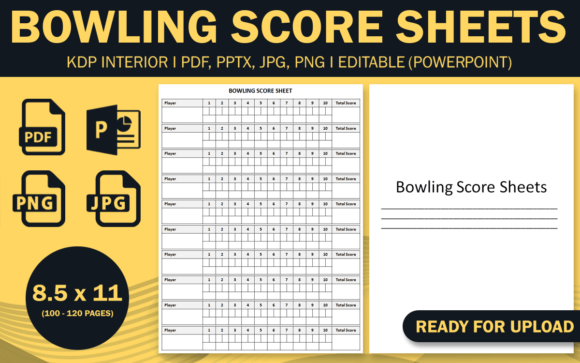
- Verify that the files include the listed formats — PPTX, 2 PDFs, JPG, PNG — and that the PDFs are high-resolution.
- Check the interior page count (100 or 120) and understand what each page contains.
- Open the editable source file (PPTX) to ensure it works in your software and is not locked or corrupted.
- Perform a test print of one or two pages to assess clarity and layout usability.
- Read any reviews or samples for mentions of print quality, ease of editing, or customer support.
A well-chosen bowling score sheet makes scoring a pleasure rather than a chore. By avoiding the common mistakes outlined here, you’ll get a product that serves its purpose — whether that’s running a smooth league, teaching new players, or publishing a professional-looking book on KDP.
Remember, the best bowling score sheets not only track numbers but also enhance the experience of the game. Take the time to evaluate your options, and you’ll end up with a tool that works for years to come.