Employee Sign In Log Book
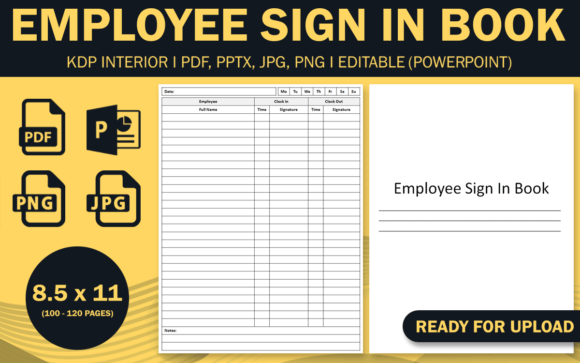
A simple sign-in sheet can do more than track arrivals. The Employee Sign In Log Book gives you a ready-made system for recording attendance, visitor arrivals, or shift start times. What makes this template genuinely useful is the full suite of file formats included: an editable PowerPoint source file (PPTX), two PDF interiors tested for KDP, plus JPG and PNG files. With trim size 8.5 × 11 inches, no bleed, and interior options of 100 or 120 pages, you have a solid foundation that adapts to many real-world scenarios.
Whether you run a small retail shop, manage a co-working space, coordinate volunteers for a community event, or publish attendance logs on Amazon KDP, this log book is designed to save you time while keeping records clear. Instead of starting from scratch, you get high-resolution interiors that work out of the box—yet remain fully customizable through the PPTX file. This balance of ready-to-use and flexible makes it a smart pick for creators, small business owners, and anyone who values organization without overcomplicating the process.
What the Employee Sign In Log Book Does Well
At its core, the log book provides structured pages where each entry captures essential details: name, date, time in, time out, and perhaps a signature or purpose of visit. The template keeps fields straightforward so you can focus on the information that matters. Because the interiors come in two page counts—100 and 120—you can choose a thickness that matches your expected usage. A 100-page book covers roughly five months of daily entries for a small team; a 120-page version extends that period or allows for extra notes.
The no-bleed trim size (8.5 × 11) is a practical choice. It means the content fits within standard paper margins, so you can print at home, at a local shop, or through KDP without worrying about cropping issues. The PDF files are already tested on KDP, removing much of the guesswork if you plan to publish and sell copies. Meanwhile, the JPG and PNG files offer flexibility for digital use—upload a single page to a website, include an image in a report, or preview the design on social media.
Creative Ways to Use the Log Book Beyond Employee Tracking
The name suggests employee sign-in, but the template adapts to many contexts. Here are several applications where you can leverage the editable source file and the clean layout.
Freelancer and Remote Team Check-Ins
If you manage a small remote or hybrid team, the log book becomes a daily check-in tool. Ask team members to log their start time and a quick task for the day. The printed book sits at a home office desk or co-working space; for remote workers, scan the page or use the PNG files to create a digital version they fill out. This builds accountability without requiring complex software.
Event or Workshop Attendance
For workshops, conferences, or training sessions, the log book serves as a visitor register. Customize the PPTX file to replace “Employee Name” with “Attendee Name” and add a column for “Company” or “Contact Email.” Print the 100-page version for a multi-day event, or use the JPG pages as single sheets to distribute at registration tables. The high-resolution interiors ensure names and signatures remain legible even when photocopied.
Co-Working Space Sign-In
Co-working spaces need a simple way to track who enters and leaves. The 8.5 × 11 size fits neatly on a clipboard near the door. Use the PPTX to add your space’s logo, WiFi code, or house rules at the top. The 120-page interior gives you months of usage before needing a replacement. Plus, the KDP-ready PDF means you can order professionally bound copies that look polished on your front desk.
School or Classroom Visitor Log
Schools often require a record of visitors for security purposes. Adjust the header in PowerPoint to say “School Visitor Log.” Keep columns for name, time in, time out, destination, and ID badge number. The large trim size gives enough room for signatures. Printing from the JPG files works if you need individual sheets for different classrooms.
Personal Productivity Tracker
You can repurpose the log book for personal use—track when you start and stop working on a project, log study hours, or record gym visits. The simple structure removes friction; you just fill in the time. Use the PNG files to load into a note-taking app or print a few sheets to test the format. Because the book is modular, you can mix personal and professional use by printing separate sections from the PDF interiors.
Practical Customization with the Editable Source File
The PowerPoint source file (PPTX) is where you unlock the log book’s full potential. Open it in Microsoft PowerPoint, Google Slides, or LibreOffice, and you can change fonts, colors, header text, and add your own branding. This is especially useful if you plan to sell the log book under your own brand on KDP or Etsy.
Tips for effective customization:
- Keep headers clear. Use bold sans-serif fonts like Arial or Helvetica for column titles so they print sharply at any size.
- Add a company logo or watermark. Place a subtle logo in the header area or footer. The no-bleed margin gives you a safe zone of about 0.25 inches inside the trim edge.
- Adjust column widths. If your team needs more space for notes, widen the “Comments” field and reduce the “Date” column – the PPTX makes this drag-and-drop simple.
- Test page count. The PDF interiors come with either 100 or 120 pages. Use the PPTX to generate a new interior if you need a different length. Duplicate the sign-in page template as many times as required, then export to PDF for final printing.
Choosing Between 100 and 120 Pages
Both options share the same layout and trim size, so your decision depends on how you intend to use the book.
- 100 pages – Lighter and easier to carry. Good for a small business with fewer than 10 employees, a short-term project, or as a trial product on KDP where lower page counts reduce printing costs.
- 120 pages – Better value for offices with regular traffic, for annual logs, or for selling a thicker book that feels more substantial. The extra 20 pages add about 10% more capacity without making the spine too thick for spiral binding or perfect binding.
Both PDFs are tested on KDP, meaning they meet Amazon’s specifications for paperback interiors. If you decide to publish, you can upload either file without additional formatting worries.
Keeping Your Log Book Clear and Professional
Whether you print at home or sell through KDP, a well-organized log book makes a better impression. Here are recommendations to maintain consistency and readability.
- Use the same styling throughout. If you change colors or fonts in the PPTX, apply those changes to every page. The template’s pages are identical, so a single edit in the master slide updates all sheets.
- Print on quality paper. For home printing, choose 20 lb or 24 lb paper. For KDP, the standard cream or white paper works well; the high-resolution interiors ensure text stays crisp even on uncoated paper.
- Add a table of contents or instruction page. Use the blank pages at the front of the PDF to insert a brief “How to Use This Log” note. Since the PPTX is editable, you can easily add an introductory page before the sign-in sheets.
- Consider binding options. Spiral binding lets the book lie flat, which is useful when people sign in quickly. Perfect binding (paperback) gives a standard book look. The no-bleed trim works for both.
Adapting for Different Audiences and Platforms
Creators and designers can take the same template and tailor it for specific niches.
- For KDP publishers – Use the PDF interiors directly or customize the PPTX to create a series: Employee Sign In, Visitor Log, Meeting Minutes, etc. The tested files give you confidence that your upload will pass Amazon’s review.
- For bloggers and educators – Offer the JPG or PNG files as free printables on your website. Write a post explaining how a simple sign-in sheet can improve classroom safety or volunteer coordination. The high-resolution images ensure they look good on screens and in print.
- For small business owners – Print the 120-page version and keep it at the front desk. Use the PPTX to add your branding, then take the file to a local print shop. The 8.5 × 11 size is standard, so you avoid specialty trimming fees.
- For freelancers and hobbyists – Use the PNG files as digital overlays in apps like GoodNotes or Notability. Import the page and fill it in on your tablet instead of printing. This gives you a portable log without carrying a physical book.
Each platform has unique requirements, but the supplied formats cover most scenarios. The JPG files are especially useful for social media previews or thumbnails if you decide to sell the log book online.
Practical Inspiration: From Template to Finished Product
Imagine you run a small graphic design studio with three part-time freelancers who share a desk. You want to know when each person arrives and leaves without micromanaging. Download the log book, open the PPTX, and change the header to your studio name. Remove the “Signature” column if not needed, and add a small “Project” column where freelancers can jot down what they’re working on. Print 100 pages, bind them at a local shop, and leave the book on the shared desk. Within a week, you have a simple record that helps with billing and scheduling.
Or consider a wedding planner who manages multiple events each month. The log book becomes a vendor check-in sheet for each wedding. Print a fresh set of pages from the PDF for each event, customize the header in PowerPoint to include the wedding date and venue, and hand it to the venue coordinator. The high-resolution interiors keep the list professional, and the JPG files let you preview the layout in your planning binder.
These scenarios aren’t hypothetical—they show how a single template can shift purpose while retaining its core function: clear, organized data collection.
Final Notes on Using the Employee Sign In Log Book
The design of this log book focuses on practicality. There are no unnecessary decorations, no tiny text, and no complex tables. That simplicity is its strength. By providing editable and print-ready files, you gain control over the final look without needing advanced design skills. Whether you’re a creator looking for a new KDP product, a business owner who needs a reliable attendance record, or an educator organizing classroom visitors, the template adapts.
Start by opening the PPTX and making small changes that reflect your context. Test the 100-page PDF for a month-long trial. If you need more capacity, switch to the 120-page version. The JPG and PNG files serve as backups for digital use or quick previews. With no bleed and standard trim, you eliminate common printing headaches. More importantly, you get a tool that respects your time—so you can focus on running your team, your event, or your creative project instead of reinventing a log book from scratch.